How to Download Aadhaar Card Online (Step-by-Step Guide)
If you have lost your Aadhaar card or need another copy, there is no need to visit an Aadhaar centre. You can easily download your Aadhaar card online through the official UIDAI website.
The downloaded Aadhaar is called e-Aadhaar. It is a password-protected PDF document that contains your Aadhaar details and is equally valid as the physical Aadhaar letter.
In this guide, you will learn how to download your Aadhaar card using your Aadhaar number, Enrollment ID (EID), or Virtual ID (VID), how to open the PDF file, and what to do if you face any problems.
What You Need Before Downloading Aadhaar
Before starting the process, keep these details ready:
Aadhaar Number (12 digits), Enrollment ID (EID), or Virtual ID (VID).
Access to your registered mobile number for OTP verification.
A mobile phone or computer with an internet connection.
How to Download Aadhaar Card Online Step By Step
Follow these simple steps to download your Aadhaar card in PDF format.
Step 1: Visit the Official UIDAI Website —> https://myaadhaar.uidai.gov.in/
Step 2: Click on the Download Aadhaar option.
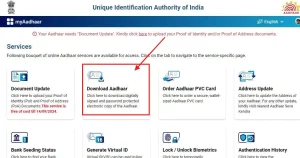
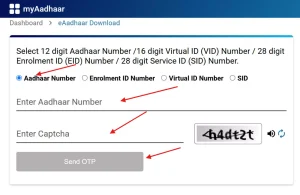
Step 3: On the next page, fill the details choose one of the available options of :-
- Aadhaar Number: Enter your 12-digit Aadhaar number.
- Enrollment ID (EID): Enter the enrollment details mentioned on your Aadhaar enrolment slip.
- Virtual ID (VID): Enter your 16-digit Virtual ID.
We Choose aadhar card number you can choose the option what you have availble right now and then fill the captcha and click on Send OTP button.
Step 4: Then enter the OTP you have recived and click on Submit button.
Step 5: If you do not want to show your complete Aadhaar number in the downloaded PDF, select the Do you want a masked Aadhaar? option, if displayed. or You can proceed direct to Enter OTP and Verify Download Button.
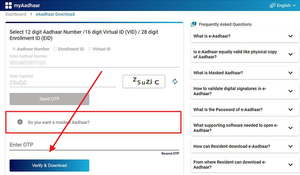
Step 6: Once OTP verification is successful, click on Verify & Download or the available download option. Your Aadhaar card will be downloaded as a PDF file. You can find it in the Downloads folder of your mobile or computer. The PDF is password-protected, so you will need to enter the correct password to open it.
What Is the Password to Open Aadhaar PDF?
Many people successfully download their Aadhaar card but cannot open the PDF because they do not know its password.
UIDAI uses a combination of the first four letters of your name in CAPITAL letters and your year of birth (YYYY) as the e-Aadhaar password.
PDF Password Format Examples
| Name | Year of Birth | PDF Password |
|---|---|---|
| RAHUL KUMAR | 1995 | RAHU1995 |
| PRIYA SHARMA | 2000 | PRIY2000 |
| AMIT | 1998 | AMIT1998 |
How to Download Aadhaar Card Without Aadhaar Number?
If you do not remember your Aadhaar number, you can still download your Aadhaar using your Enrollment ID (EID) or Virtual ID (VID), provided you have the required details.
Here are the available options:-
- Using Enrollment ID: Find your EID on the enrolment slip and use it on the UIDAI download portal.
- Using Virtual ID: Enter your 16-digit VID instead of your Aadhaar number.
- Retrieve Aadhaar Number: If you have lost both your Aadhaar number and enrolment ID, use the UIDAI’s Retrieve Lost or Forgotten Aadhaar service.
You will still need OTP verification on your registered mobile number to download e-Aadhaar online.
Conclusion
Downloading an Aadhaar card online is a simple process. You just need your Aadhaar number, EID or VID and access to your registered mobile number for OTP verification.
Always use the official UIDAI website to download your Aadhaar and avoid sharing your personal details or OTP with unknown websites or individuals.
FAQs
Q1. Can I download my Aadhaar card using my mobile phone?
Yes, you can download your Aadhaar card using any smartphone or computer. Visit the official UIDAI website, complete OTP verification and save the e-Aadhaar PDF.
Q2. Can I download my Aadhaar card if my registered mobile number is switched off?
You cannot complete the regular online OTP verification if you cannot access your registered mobile number. You will need to update your mobile number through an Aadhaar enrolment centre.
Q3. Can I use a downloaded Aadhaar PDF instead of my original Aadhaar card?
Yes, e-Aadhaar is an officially recognised and digitally signed document. It has the same validity as the physical Aadhaar letter and can be used wherever Aadhaar is accepted.